Quick Start
Welcome to PromptHub! This guide will help you get started in under 2 minutes.
1. Install & Launch
Download and install the app for your OS. You’ll see a clean workspace on first launch.
- macOS: Download DMG and drag to Applications.
- Windows: Run the installer.
2. Visual Management
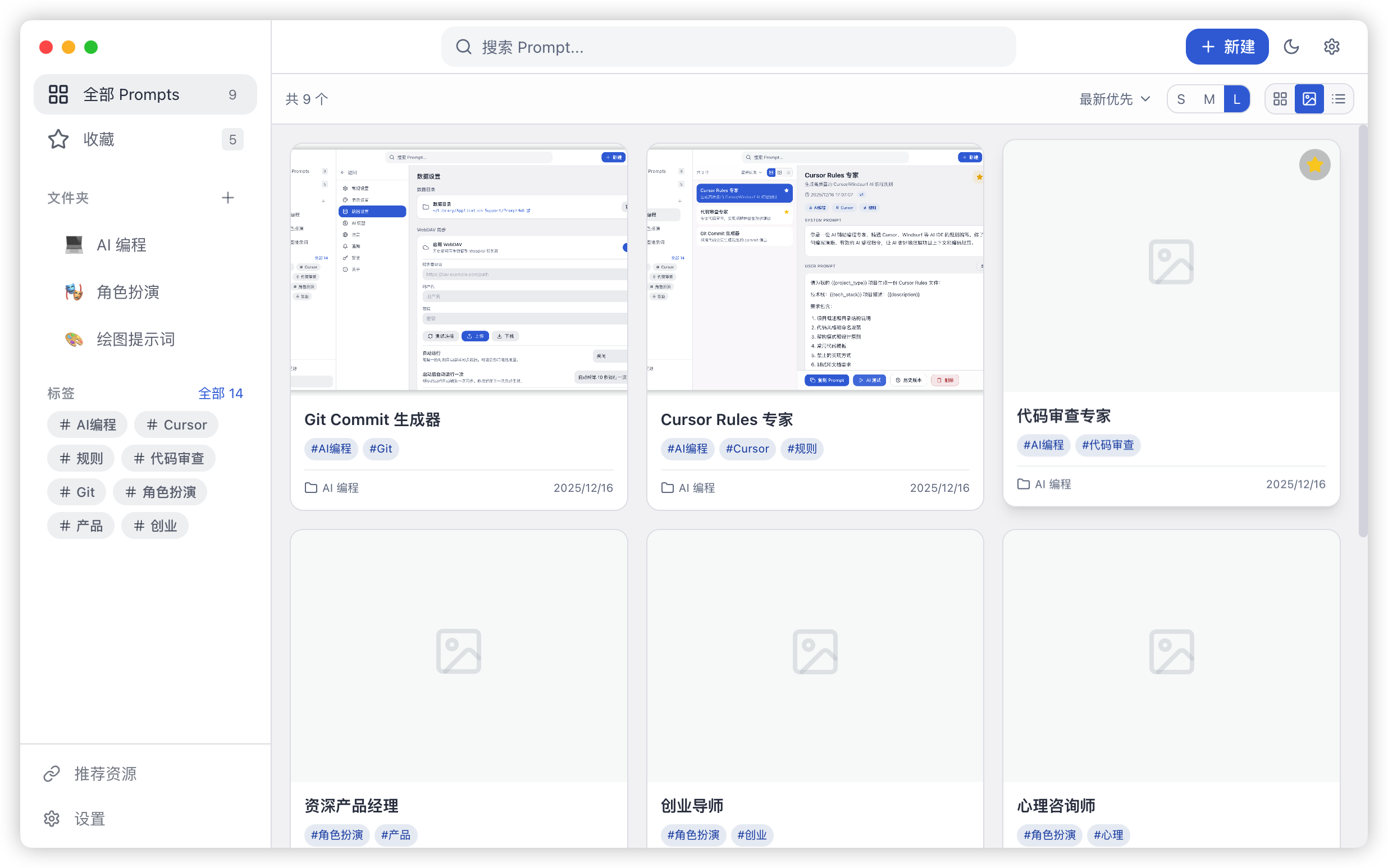
PromptHub defaults to Gallery Mode, allowing you to find prompts at a glance with visual cards. You can also switch to list view in the top right for bulk actions.
3. Create First Prompt
- Click ”+ New” in the top right.
- Enter a title and write your prompt content.
- Try using
{{variable}}syntax; it becomes a fillable form after saving. - Press
Cmd/Ctrl + Sto save instantly.
4. Variables & Usage
In the prompt details, click “Copy Prompt” at the bottom. If variables are present, you’ll be prompted to fill them. The rendered content is automatically copied to your clipboard.
5. Essential Shortcuts
We’ve streamlined the most useful operations:
| Shortcut | Action |
|---|---|
Alt + Shift + P | Show / Hide Window |
Alt + Shift + N | Create New Prompt |
Cmd/Ctrl + F | Global Full-Text Search |
Cmd/Ctrl + Enter | Save & Close Editor |